Editors
VS Code
Install from the Marketplace →
Or from inside the editor: open Extensions (Ctrl+Shift+X /
Cmd+Shift+X), search for HCL Schema, and pick the one published by
avestura. From a terminal:
code --install-extension avestura.hcl-schema
The binary for your platform ships with the extension, so there is nothing else
to install — no Go toolchain, no PATH setup. Packages are published per
platform (Windows, macOS, Linux and Alpine, on x64 and arm64, plus 32-bit ARM),
so the download is around 4 MB rather than carrying every platform's binary.
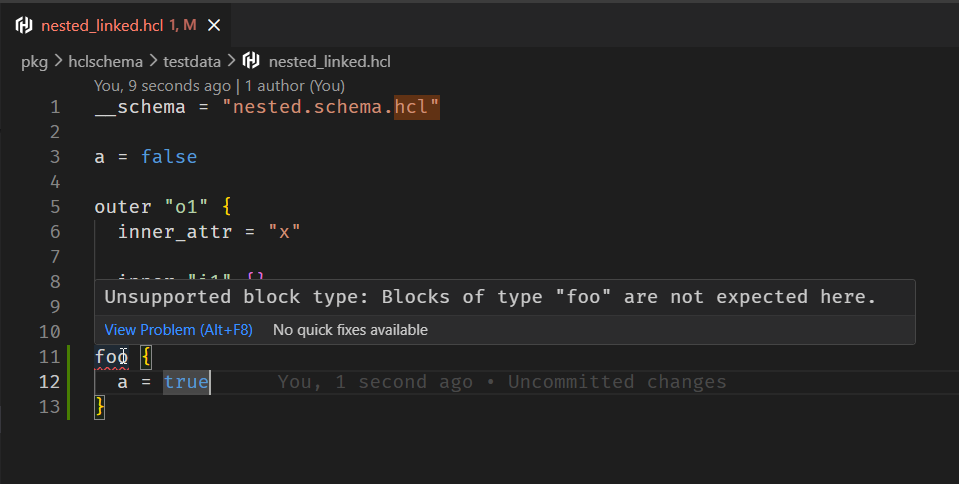
Point a file at a schema and it starts working:
__schema = "./service.schema.hcl"

name = "checkout"
Settings
| Setting | Default | Meaning |
|---|---|---|
hclSchema.cliPath | "" | Path to the binary. Empty uses the bundled one. |
hclSchema.strict | false | Apply draft 2026-09 rules to older schemas |
hclSchema.offline | false | Never fetch remote schemas |
hclSchema.cacheDir | "" | Where cached remote schemas live |
Commands
Run these from the command palette (Ctrl+Shift+P / Cmd+Shift+P):
- HCL Schema: Validate active file
- HCL Schema: Restart language server
- HCL Schema: Show output — the server's log, for when something looks wrong
Troubleshooting
If nothing happens on an HCL file, check in this order:
- The file has a
__schemaattribute, and the path it names resolves. - Show output reports the server starting rather than an error.
- If you set
hclSchema.cliPath, the binary there is version 0.1.0 or later — an older one has nolspsubcommand. Clear the setting to fall back to the bundled binary.
The language server
Any LSP client can use it:
hclschema lsp
| Capability | What it gives you |
|---|---|
publishDiagnostics | Validation of the unsaved buffer |
completion | Declared attributes and blocks; enum values on an attribute |
hover | The description, type, bounds and default from the schema |
definition | Jump from a use in the instance to its declaration in the schema |
documentSymbol | An outline of the document |
The previous integration ran the CLI against the file on disk on every keystroke, so unsaved edits were checked against stale content. The server holds the buffer and checks that.
Neovim
vim.api.nvim_create_autocmd('FileType', {
  pattern = 'hcl',
  callback = function(args)
    vim.lsp.start({
      name = 'hclschema',
      cmd = { 'hclschema-cli', 'lsp' },
      root_dir = vim.fs.root(args.buf, { '.git' }),
    })
  end,
})
Helix
# languages.toml
[language-server.hclschema]
command = "hclschema-cli"
args = ["lsp"]

[[language]]
name = "hcl"
language-servers = ["hclschema"]
Anything else
The server speaks LSP over stdio with Content-Length framing. Point your
client at hclschema-cli lsp and give it the hcl language id. It advertises
full-document sync, so there is no incremental-sync support to negotiate.